


Edge Lighting: LED Borderlight
4.61.11K Reviews
App Specs
- Version
- 540
- Updated On
- License
- Free
- Downloads
- 10,000,000+
- Developer
- Maxlabs Personalization Tools
- Categories
- Personalization
- Platform
- Android
Screenshots
 Analysis by AppCompare
Have you ever wanted your phone screen to look like it just stepped out of a futuristic movie? Well, that's exactly what Edge Lighting: LED Borderlight sets out to do. I stumbled upon this app while searching for ways to jazz up my phone's appearance, and let me tell you, it does not disappoint.
Why the glow catches my eye at first
That first burst of color is the app’s strongest hook. A moving border changes the feel of a familiar screen without asking me to replace my wallpaper or rearrange my home screen. I can see the appeal if, like me, you enjoy small visual tweaks that make a phone feel more personal. The effect is easy to notice, but it works best when the colors suit the rest of the screen rather than compete with every icon and notification.
The app is a free personalization tool from Maxlabs Personalization Tools, and it has a 4.7 average from around 86,000 ratings. More than five million installs suggest that this kind of edge effect has broad appeal, but popularity is not the same as a reason to keep it installed. For me, the useful question is whether I would still want the border after the novelty wears off.
First Impressions and Features
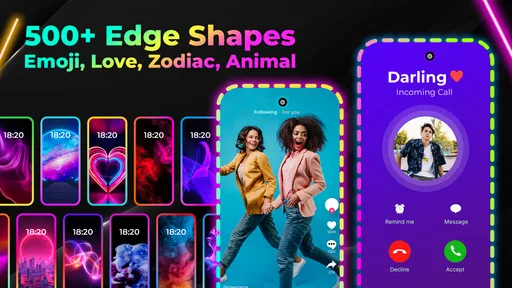
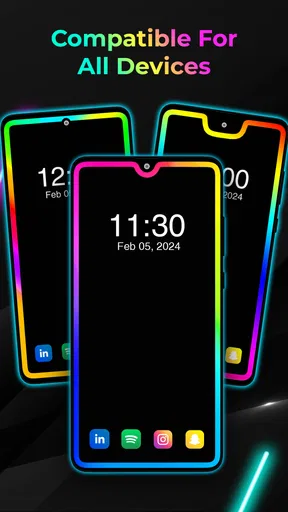
When I first opened Edge Lighting: LED Borderlight, I was greeted with a sleek and intuitive interface. The app is designed to let you customize the border of your phone with vibrant LED lights that dance around the edges of your screen. It's like giving your phone a neon glow-up.
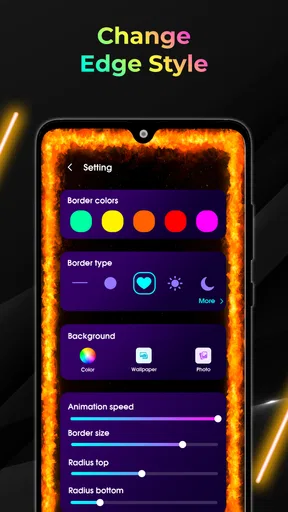
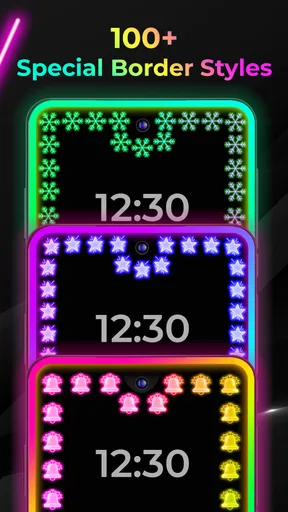
The app offers a wide array of colors and effects. You can choose from static colors or opt for dynamic color changing effects. Plus, it lets you adjust the speed and thickness of the border light, which is perfect if you want to fine-tune your look.
Customization Galore
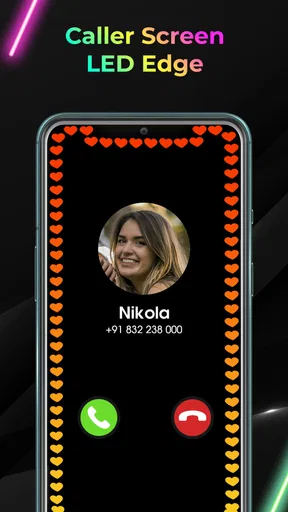
One of the standout features is how customizable everything is. You can set different lighting styles for various notifications, which means you can get a subtle blue glow for a text message or go wild with a rainbow effect for incoming calls. It's a fun way to add a personal touch to your device.
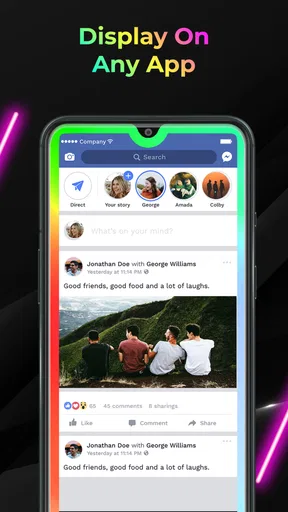
Another cool aspect is the option to apply border lighting to any app. Whether you're scrolling through Instagram or checking emails, the LED lights can follow you everywhere, making the experience a little more exciting. Oh, and did I mention that you can set it to only activate on specific apps? That way, you won't have to worry about your battery draining unnecessarily.
Worth Reading Before You Choose

EA SPORTS FC Mobile 26 Is a Bigger Football Game, but It Takes Time

Flipboard Shows What News Apps Must Do Beyond the Feed

Switching to Android Auto Means Rethinking Your Driving Routine

Google Calendar Makes a Crowded Week Easier to Manage

Ludo King Makes the Most of the Minutes Between Plans

Baby Panda World Brings Quick Play to Modern Phones, but Its Game Library Feels Busy
Making the effect useful rather than constant
The app makes most sense when I treat the border as a cue, not permanent decoration. A restrained color for an important alert can help a notification stand out when I glance at the screen; turning on the effect for every app risks making the edge visual noise. I would start with only the notifications or apps I genuinely care about, then add more only if the distinction remains helpful.
There is a practical trade-off in choosing motion, speed, and thickness. A brighter, faster animation is more conspicuous, while a narrower or calmer treatment is easier to live with during ordinary reading. I would preview a few combinations against both a light and a dark screen before settling on one. A setting that looks striking on a sample background may feel too busy over a real message or email.
This also makes the app different from the usual wallpaper-first personalization options. A static wallpaper changes the backdrop but leaves the screen’s edges alone; a launcher changes how icons and app pages are arranged. Edge lighting is a more focused cosmetic layer, so it is a better fit if I like my existing layout and only want a little movement around it. If I want a complete visual redesign, a wallpaper or launcher will do more.
Performance and Usability
I was pleasantly surprised by how smoothly the app runs. Despite my initial concerns about potential lag, the animations are fluid and don't interfere with the phone's overall performance. The developers seem to have optimized it well, ensuring that even older phones can handle the added bling.
The app doesn’t bombard you with ads either, which is a huge plus in my book. You get a clean, uninterrupted experience, and the occasional ad is non-intrusive. Plus, they offer a premium version if you want to unlock even more features and ditch ads completely.
What to expect from everyday use
Imagine checking a message while waiting for a bus, then switching to your calendar and email during the same short break. If I have chosen a modest border and limited which apps trigger it, the changing edge can add a quick visual signal without taking over the task. If I have enabled it across everything, the same commute can become a stream of animations that I stop noticing. Selective setup is not just a battery-conscious choice; it helps preserve the effect’s usefulness.
People who like to refresh their phone’s appearance now and then are likely to get the most enjoyment from it. It is also a reasonable choice for someone who wants a decorative edge without changing their normal app layout. On the other hand, I would skip it if I prefer a plain screen, find motion distracting, or mainly want a system-level way to organize icons and widgets. In those cases, a static background or built-in display settings may be a better match.
One useful habit is to revisit the configuration after the first few days rather than keep every option enabled just because it is available. I would remove triggers that feel redundant and keep the combinations that make alerts easier to distinguish. That small edit can turn a novelty into a deliberate accent. It also gives me a clearer sense of whether the app is contributing something I actually value.
Setting It Up
Getting started with Edge Lighting is a breeze. After a quick download and install, the app walks you through the setup process. You’ll need to grant some permissions, but it’s nothing too invasive. The interface is user-friendly, guiding you step by step without overwhelming you with options all at once.
I particularly appreciated the preview feature. It lets you see exactly what your settings will look like before you apply them, so you can experiment without any commitment. It's a small touch, but it makes a big difference in the overall experience.
Keeping the setup comfortable over time
My approach would be to make one change at a time: choose a border style, check the preview, then decide whether to adjust its thickness or animation. That is more useful than changing several things together, because I can tell which choice made the screen feel better or busier. If I use the app for selected apps, I would also review that selection whenever my daily routine changes; an old list can keep the effect active in places where it no longer helps.
There is a maintenance cost, even if it is small. Any visual layer that follows me across apps needs to feel appropriate in different contexts, from reading a long email to looking at a photo. If the border distracts from content, I would tone it down or limit where it appears rather than trying to make one dramatic style work everywhere. The preview helps with choosing a look, but my real test is whether I still like it while using the phone normally.
The app is free to try, with in-app purchases ranging from $2.99 to $39.99 per item. I would spend time with the basic experience before paying for anything: first decide whether the border becomes part of my routine, then consider whether an extra option would genuinely improve it. The current version is 538, and it runs on Android 6.0 or later. Its Everyone age rating also makes it suitable for a broad audience, though the main question for any user is simply whether animated screen decoration fits their taste.
Final Thoughts
In a world where personalizing our devices is part of expressing who we are, apps like Edge Lighting: LED Borderlight offer a simple yet effective way to stand out. Whether you’re looking to impress your friends or just want to enjoy a unique look every time you pick up your phone, this app has got you covered.
Overall, the app adds a touch of flair without compromising on functionality. It's easy to use, highly customizable, and just plain fun. If you're in the market for something to spruce up your phone's look, I definitely recommend giving Edge Lighting a try. Happy customizing!
Does it earn a lasting place?
For me, the answer depends on restraint. The first-week appeal is clear: the edge adds a playful detail, and trying color and motion combinations is enjoyable. Month to month, the value is less about constantly changing the look and more about finding a calm setup I still notice for the right reasons. If I stop noticing it altogether, or if it makes the screen feel cluttered, there is little point in keeping it active.
I would recommend Edge Lighting: LED Borderlight to someone who enjoys visual customization, wants to keep their existing home-screen arrangement, and is willing to tailor the effect instead of switching everything on. I would not recommend it to someone seeking a functional organizer, a major interface overhaul, or an always-quiet screen. The app is at its best as a small, optional flourish: easy to experiment with, simple to pare back, and worth keeping only if its glow still feels welcome after the first impression fades.
Pros
- Customizable color options enhance personalization.
- Smooth animations without draining battery life.
- Compatible with various screen sizes and devices.
- Easy-to-use interface for quick setup.
- Works seamlessly with notifications.
Cons
- Limited free features; premium required for more.
- Ads can be intrusive during customization.
- Occasional lag on older devices.
- No option to sync settings across devices.
- Lacks integration with some apps.
FAQs for Edge Lighting: LED Borderlight
What is Edge Lighting: LED Borderlight and how does it enhance my device?
Edge Lighting: LED Borderlight is an application designed to add customizable LED lighting effects around the edges of your device's screen. It enhances the aesthetic appeal by providing vibrant, colorful border lights that can be adjusted to your preference. This app not only beautifies your device but also offers notifications and alerts in a visually appealing way.
Is Edge Lighting: LED Borderlight compatible with all devices?
While Edge Lighting: LED Borderlight is designed to work on most Android devices, compatibility can vary depending on the make and model of your phone. It is recommended to check the app’s description in the Google Play Store for specific compatibility information. The app may not function optimally on older devices or those with non-standard screen sizes.
How customizable are the lighting effects in Edge Lighting: LED Borderlight?
The app offers extensive customization options for the lighting effects. Users can adjust colors, patterns, and the speed of the animations to suit their personal style. Additionally, you can set different lighting effects for various notifications, creating a unique and personalized visual experience for each alert.
Does using Edge Lighting: LED Borderlight significantly impact battery life?
The app is designed to be efficient, but some battery usage is inevitable due to the visual effects. Users can manage this by adjusting the brightness and duration of the lighting effects, or by limiting their use to specific notifications. It's advisable to monitor battery performance and make adjustments as needed to balance aesthetics and power consumption.
Are there any privacy concerns when using Edge Lighting: LED Borderlight?
Edge Lighting: LED Borderlight requires minimal permissions to function, typically related to notifications and display settings. The app does not collect personal data or require internet access, which minimizes privacy concerns. However, it's always a good practice to review app permissions and understand what data is accessed before installation.


